
Every client's month, planned in one calendar
Plan, draft, approve and publish social content for all of your brands from one workspace. Built for agencies and in-house teams who are running more than one account and are tired of doing it in a spreadsheet.
Publishes to
Why this exists
Running five accounts is a different job to running one
Tools built for a single brand break the moment you add a client book, a review step and somebody else's approval. This is what that looks like.
The plan lives in a spreadsheet
One tab per client, colour-coded by hand, and nobody is quite sure which version is current. Nothing in it can actually publish.
Approvals happen in WhatsApp
A caption goes out as a screenshot, the client replies with a voice note, and the change never makes it back into the plan.
The same post, retyped five times
Shorter for X, hashtags for Instagram, a professional tone for LinkedIn. Same idea, five windows, five chances to publish the wrong one.
Per-brand pricing punishes growth
Most schedulers charge by the account or the seat, so signing your fifth client costs more in software than the client is worth in month one.
How it works
One path from idea to published
Nothing skips the queue and nothing goes live unreviewed unless you say so. The same five steps, whether it is one brand or thirty.
Plan
Fill the month
Lay out a whole month per brand on one calendar. Filter to one client, or see the whole book at once.
Create
Write it once
One caption, tailored per network where it needs to be, with live previews of how each will look.
Approve
Send it for review
Drafts go to a queue. A reviewer approves or asks for changes in a thread attached to the post itself.
Publish
It goes out on time
Approved posts publish on schedule to every connected account, and tell you honestly if one fails.
Measure
See what worked
Engagement by brand, by platform and by post, with the best time to publish read out of your own numbers.
The workspace
Four screens that replace the whole workflow
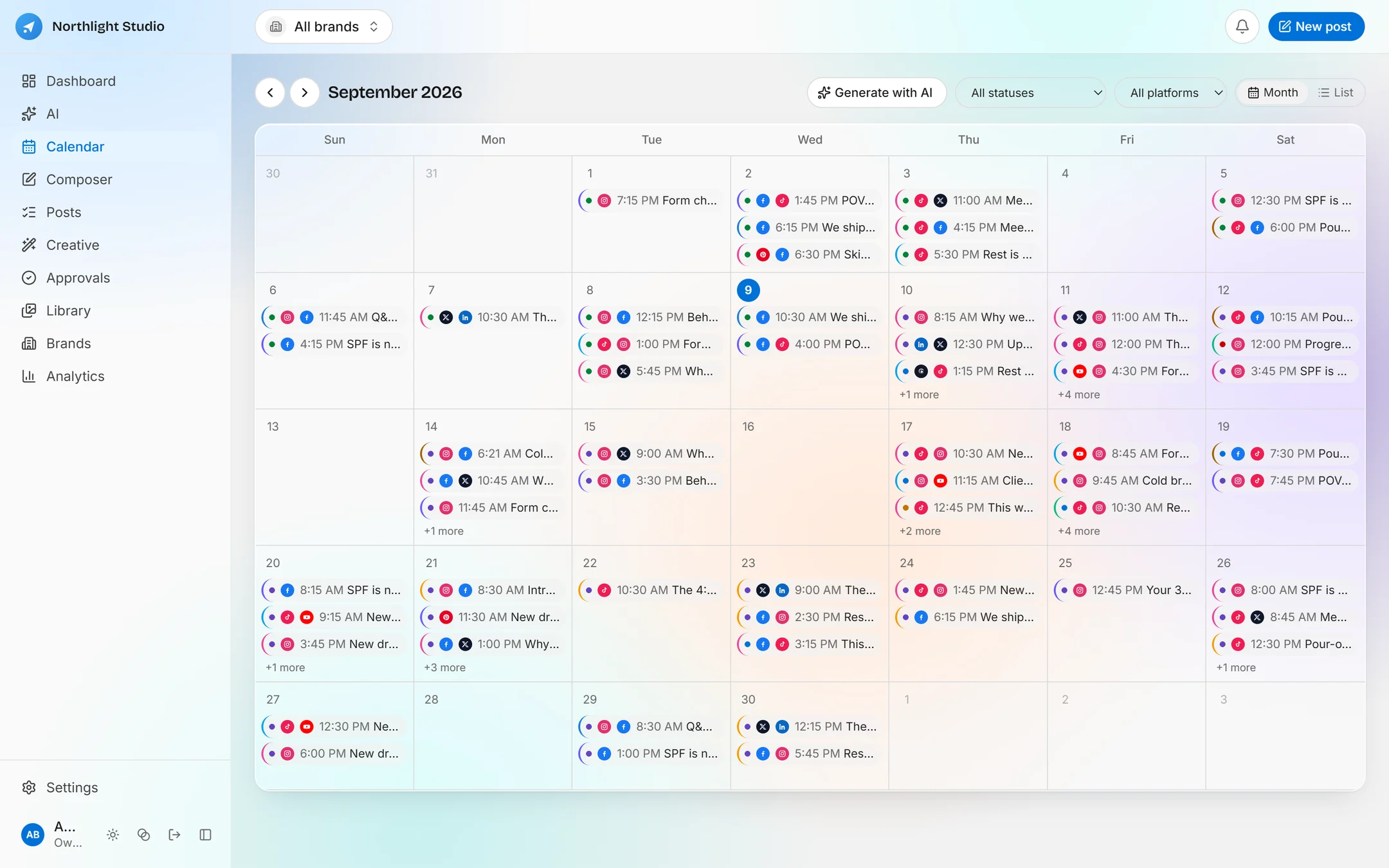
Content calendar
The whole book, one grid
Month and list views, filtered by brand, platform or status. Drag a post to move it. Colour tells you at a glance what is a draft, what is waiting on a client and what is already live.
- Filter to one client, or plan across all of them at once
- Drag and drop to reschedule, on desktop or by long press on mobile
- Platform icons and brand colour on every chip, so nothing needs opening to identify
- Generate a month of ideas with AI and accept only the ones you want
Composer
Write once, ship everywhere
Pick the brand, tick the accounts, write the caption. Where a network needs something different you override just that one, and a live preview shows exactly what each will look like before you commit.
- Per-platform caption overrides with live character counts
- Real previews for Instagram, X, Facebook, LinkedIn and the rest
- Media from the shared library, an upload, or generated on the spot
- Save a draft, send for approval, schedule, or publish now
Approvals
The client sign-off, on the record
Work submitted for review lands in a queue instead of a chat. Approve it, or ask for changes with a comment attached to the post, so the feedback and the thing it is about never get separated again.
- One queue for everything awaiting a decision, across every brand
- Threaded comments per post, with the whole history kept
- Changes requested sends it back rather than letting it publish
- Approval can be required by default, or waived per post
Analytics
Numbers you can put in a client report
Impressions, reach, engagements and clicks, broken down by platform and by brand, over the window you choose. Export to CSV when the monthly report is due.
- Engagement over time, by platform and by brand
- Top performing posts, and a best-time-to-post heatmap from your own data
- Any range from 7 to 90 days, exported in one click
- AI analysis on request, which refuses to run on numbers it cannot vouch for
AI that earns its place
It writes the caption and draws the picture
Most schedulers bolt a caption generator onto the side. This one plans the month, writes the copy, art-directs the image, storyboards the carousel and scripts the reel, from a brief built out of the brand you are posting for.
Command centre
Say what you need, in a sentence
Ask for next week's content, a carousel from your best post, or a reason engagement dropped. The model picks a tool, the server re-checks the arguments and your role, and the work runs as a job you can walk away from.
- Plain-language requests across planning, drafting and repurposing
- A briefing panel that tells you what needs attention today
- Long jobs run in the background and survive you closing the tab
- Every proposal is reviewable before it becomes a post
Creative Studio
From caption to finished creative
Open a post and generate for it. The Studio turns the post into a brief, art direction drafted from the brand, its voice, its industry and its products, and you can read and edit that brief before a penny is spent.
- Image variations, with reference images where the provider supports them
- Carousels planned as an argument first: each slide declares its job before it is drawn
- Video and reels scripted and corrected before a renderer is touched
- Everything generated lands in the library as an ordinary asset
Your key, your bill, no markup
Connect your own OpenAI, Anthropic, Gemini, kie.ai or fal.ai account. Generation is billed to you by them at their price. We never resell tokens, so there are no credits to buy and nothing to run out of mid-month.
Five providers
Pick one, or a different one per kind of work
Routed by capability
Text, images and video each go where they are best served
Keys sealed at rest
AES-256-GCM, inert in the database without the master key
Off by default
With no provider configured every AI control is disabled and says why
What it will not do
You are posting on someone else's behalf. A tool that guesses confidently is worse than one that says it does not know.
Nothing publishes unreviewed
Generated posts land in a proposals inbox and become real posts only when a person accepts them. They cannot enter the calendar on their own.
It will not invent a price
Add your client’s products and the model works from the real catalogue. Without them it is told the price is unavailable, rather than making one up.
It refuses to analyse fake numbers
Until real accounts are connected and publishing, performance analysis says it is unavailable. Analysis of simulated metrics reads exactly like the real thing, which is the problem.
A failure stays a failure
A generation that fails is reported as failed. It is never quietly replaced by a stand-in that looks like a result.
Everything in one workspace
Built around a client book, not one account
Every query in the product is scoped to your agency and filtered by brand, so a creator working on one client never has to see, or touch, another.
Brands
A profile, a colour, a timezone and a voice per client, with their connected accounts and their real product catalogue attached.
Content library
Every image and video in one searchable place, tagged, reusable, and showing which posts already used it.
Posts
Everything written, scheduled or published, filterable by status and brand, with bulk actions, trash and restore.
Unlimited team members, on every plan
Per-seat pricing on a cheap tool just makes a team share one login, which is worse than the revenue is worth. Invite everyone who touches the work.
Owner
Full control of the agency, billing and every brand
Admin
Manages brands, accounts and the team, and approves work
Member
Creates and submits content for review
Viewer
Reads the plan and the numbers, changes nothing
iOS and Android
Approve from the back of a taxi
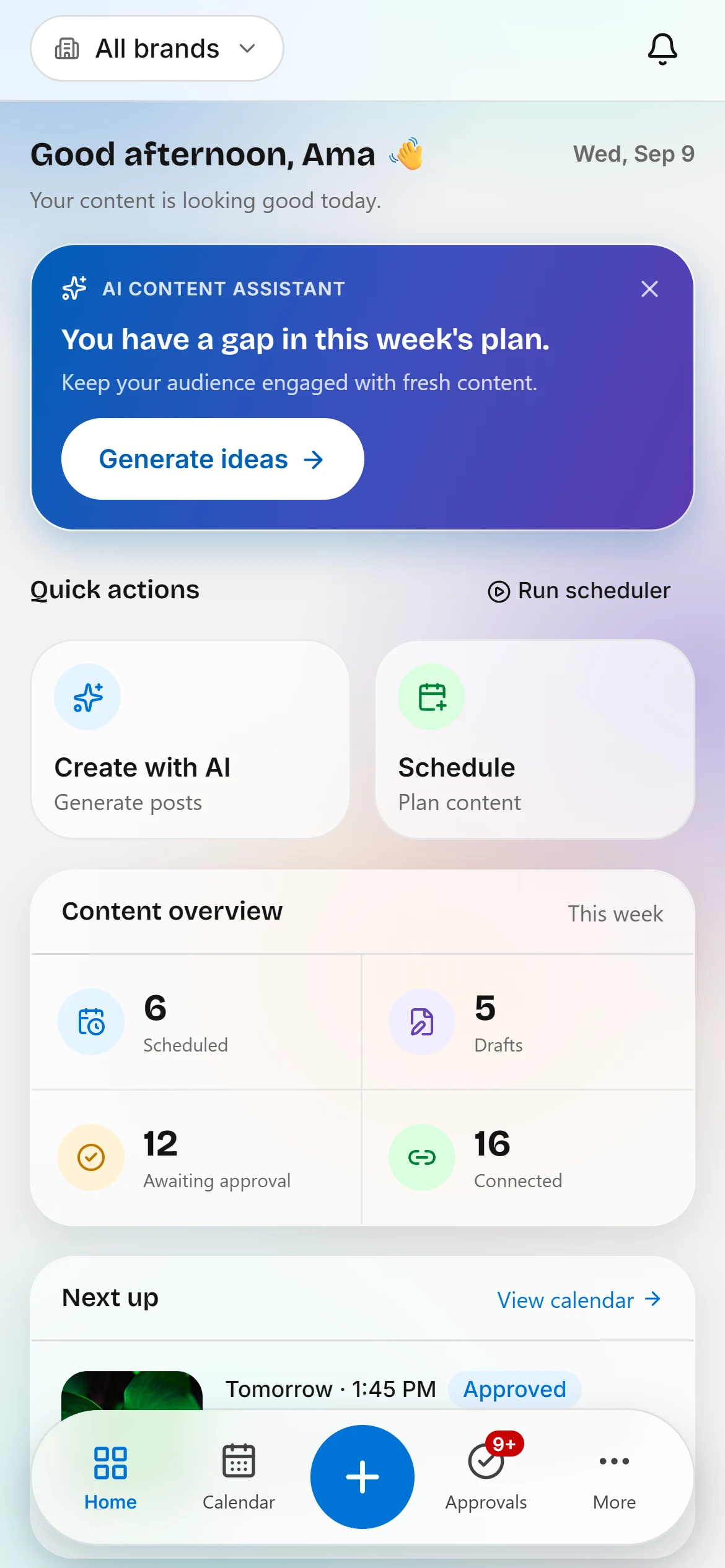
Everything the web app does that a phone can carry: the dashboard, the calendar, the composer, the approval queue, the library, brands, analytics and the AI. Same data, same agency, same design, in light or dark.
The camera
The shot you want was taken thirty seconds ago and is not in the library yet. Post it from where you are standing.
Offline reads
Query results persist, so the app opens to yesterday’s calendar in a lift rather than to an error.
A biometric lock
A phone handed to someone for a moment does not also hand over a client’s unpublished content.
For teams already using AI
Let your own assistant work inside the app
Incep Social ships an MCP connector. Claude, Claude Code or Codex authorises once in a browser and can then plan, draft, schedule, publish and review here, writing the content itself and spending none of your provider credits.
Authorise once
A browser approval, the same shape as connecting any app. No keys pasted into a config file.
It does the writing
The agent brings its own model, so drafting through it costs you nothing on top of what you already pay for it.
Scoped and re-checked
A token carries scopes, and the server re-validates the arguments and the caller’s role before anything runs.
Who it is for
Anyone posting for more than themselves
Social media agencies
A client book with an approval step and a report at the end of the month.
Full-service agencies
Social sitting alongside the rest of the work, not in a separate tool nobody logs into.
In-house marketing teams
Several product lines or regions, each with its own accounts and its own sign-off.
Freelance social managers
Two or three retainers, run properly, on a plan that costs less than a client lunch.
Multi-branch retail
One brand, many locations, each posting locally without going off-message.
Restaurant groups
A shared library of food photography and a calendar per venue.
Brands with a roster
A parent brand and its sub-brands planned together, published separately.
Content studios
Creative made in the studio, approved by the client, scheduled from the same place.
Why Incep Social
The agency features, without the agency price
Approvals and multi-brand are normally the line between a starter plan and an enterprise contract. Here they are in the cheapest plan.
| Capability | Spreadsheet Free, and cannot publish | Single-brand scheduler Built for one account | Enterprise suite Capable, and priced for it | Best fit Incep Social Built for a client book |
|---|---|---|---|---|
| Many brands in one workspace | ||||
| Client approval queue with threaded feedback | ||||
| Compose once, override per platform | ||||
| Publishes to eight networks | ||||
| AI that generates images, carousels and reels | ||||
| Bring your own AI provider key, at cost | ||||
| Unlimited team members on every plan | ||||
| Connect your own AI agent through MCP | ||||
| Mobile app with camera and offline reads | ||||
| Starts under GH₵50 a month |
Pricing
Priced by what you publish
Not by seat, and not by connected account. A post counts once when it publishes, however many networks it goes to.
Starter
One or two brands, planned properly.
14 days free, then $5/mo. No card required.
- 2 brands
- 5 connected accounts
- 100 published posts a month
- Unlimited team members
Growth
A small agency roster with room to grow.
Billed monthly at $15. Change plan or cancel any time.
Or try it free for 14 days on Starter- 8 brands
- 20 connected accounts
- 400 published posts a month
- Unlimited team members
Agency
A full client book, published at volume.
Billed monthly at $35. Change plan or cancel any time.
Or try it free for 14 days on Starter- 30 brands
- 60 connected accounts
- 1,200 published posts a month
- Unlimited team members
In every plan
- Unlimited team members
- All eight networks
- Client approval workflow
- Content library and brand kits
- Analytics, heatmaps and CSV export
- AI writing, images, carousels and reels
- Mobile app for iOS and Android
- MCP connector for your own AI agent
Prices are per agency, per month, and include every brand and every team member inside your plan's limits. AI generation runs on your own provider key and is billed to you by that provider, never by us.
FAQ
Questions, answered
Instagram, Facebook, TikTok, LinkedIn, X, YouTube, Threads and Pinterest. You connect each client’s accounts once, and a single post can go to as many of them as you choose.
Plan next month before it starts
Bring every client into one calendar, put the approvals somewhere they can be found, and let the schedule do the publishing.